ByNav & Septentrio settings in AgOpenGps – Antenna mounting
September 9, 2021Mounting the GPS/position antenna on the right side of the tractor
Heading Antenna Left
Position antenna connection:
Bynav at antenna 1 (right)
Septentrio at the outer antenna connector
Heading antenna:
ByNav at antenna 2 (center)
Seventh trio at the inner connection
If the tractor is driving in the wrong direction, the cables are wrong!
Settings in AgOpen:
- Distance from the rear axle to the antennas – they should both be exactly parallel to the axle.
- Antenna height
- Offset: Distance of the right antenna to the vehicle center (minus the entered value)

Select DUAL in the settings

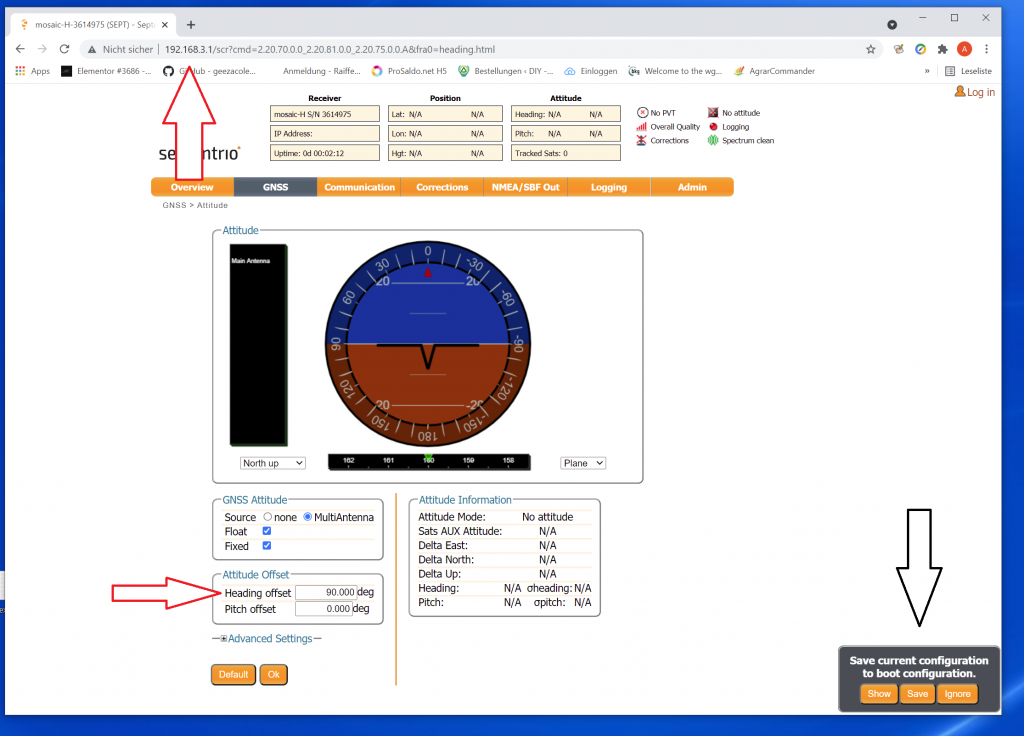
Changing the heading in Septentrio (due to inaccurate assembly).
Connect the USB-C cable to the module (antenna side).
After a few seconds, a drive will appear. Install the Ethernet to USB drivers for it.

Wait – possibly remove the module and reconnect it. Wait.
Open your browser and enter 192.168.3.1 to access the module.
Change the GNSS /Attitude Heading setting and confirm with OK!
Don't forget to save the current configuration.
Tip – Activate L5: The L5 signal is switched off by default in the mosaic model. Admin → Expert Control → Control Panel → Navigation → Advanced User Settings → Tracking → Signal Tracking Select all bands, confirm with OK, and save the configuration. See the instructions for more information. Mosaic X as base station.